The 5 AI Tools I Use in My Classroom
The percentage of students who feel genuinely supported by AI-assisted learning resources dropped from 29% to 13% between 2024 and 2026, even as the number of tools tripled. Jobs for the Future, 2026 More tools did not help. A shorter, better-chosen list will. Here are the five I actually use, why I stopped looking for more, and how to fix the one problem that wastes the most time.
- Most teacher AI frustration is not a tool problem. It is a selection problem. Five well-chosen tools outperform fifty poorly understood ones.
- The biggest time drain is the daily context tax: re-explaining your classroom to an AI that forgot everything overnight. There is a fix.
- Never input student personally identifiable information into a consumer-grade AI tool. This violates FERPA and COPPA regardless of how convenient it feels.
- The five tools are Claude, ChatGPT, Gemini, Perplexity, and NotebookLM. Each does one thing better than the others. Pick two and master them before adding anything.
The Tool Overload Problem
Every week there is a new AI tool that promises to change teaching. Every month a district administrator forwards a newsletter about platforms that will save teachers three hours a day. By 2026, the average secondary school teacher had access to dozens of AI applications, most of them untested, several of them contradictory in their guidance, and almost none of them integrated with each other in any useful way.
The result is not efficiency. It is paralysis. Researchers at Jobs for the Future describe this moment as the "messy middle" of AI adoption: institutions have moved fast enough to mandate tools but not fast enough to explain how to use them. Approximately 13% of learners remain entirely unaware of their school's official AI stance in 2026. Jobs for the Future, 2026 The cognitive and operational burden of navigating that gap lands on individual classroom teachers.
The teacher frustration this generates is not primarily about AI being bad. It is about having too many mediocre options and no clear framework for choosing between them. The practitioner-led response across educator communities in 2025 and 2026 was consistent: stop adding tools. Get very good at a very short list.
That is the only framework that works. Five tools. Understood deeply. Used deliberately. For more on the burnout cycle this creates, see AI Tool Overload and Teacher Burnout.
The Daily Context Tax and How to Fix It
The single most common complaint in educator AI communities in 2026 is not hallucinations, not inaccurate outputs, not student misuse. It is this: the tool forgot everything again.
When teachers use a generic foundational model without persistent memory, they spend the first several minutes of every session re-explaining who they are. Grade 11 chemistry. Canadian curriculum. Twenty-eight students, four with IEPs. Prefer bullet-point summaries over paragraphs. Do not use American spelling. That is five minutes of unpaid setup every single day, across every tool in the stack. Teachers call it the daily context tax.
The fix is a digital twin: a single document that describes your professional identity, classroom context, curriculum standards, and preferences. You write it once. Then you upload it permanently.
In Claude: Create a Project. Upload your context document. Every conversation inside that Project loads your context automatically from session one.
In ChatGPT: Go to Settings and use Custom Instructions. Paste your context document. It loads in every conversation without any action on your part.
This eliminates the context tax entirely. An estimated 15 to 45 minutes per task are recovered when this setup is in place. Jobs for the Future, 2026 For a full walkthrough of building this setup, see How to Stop AI Amnesia in Lesson Planning.
The Five Tools
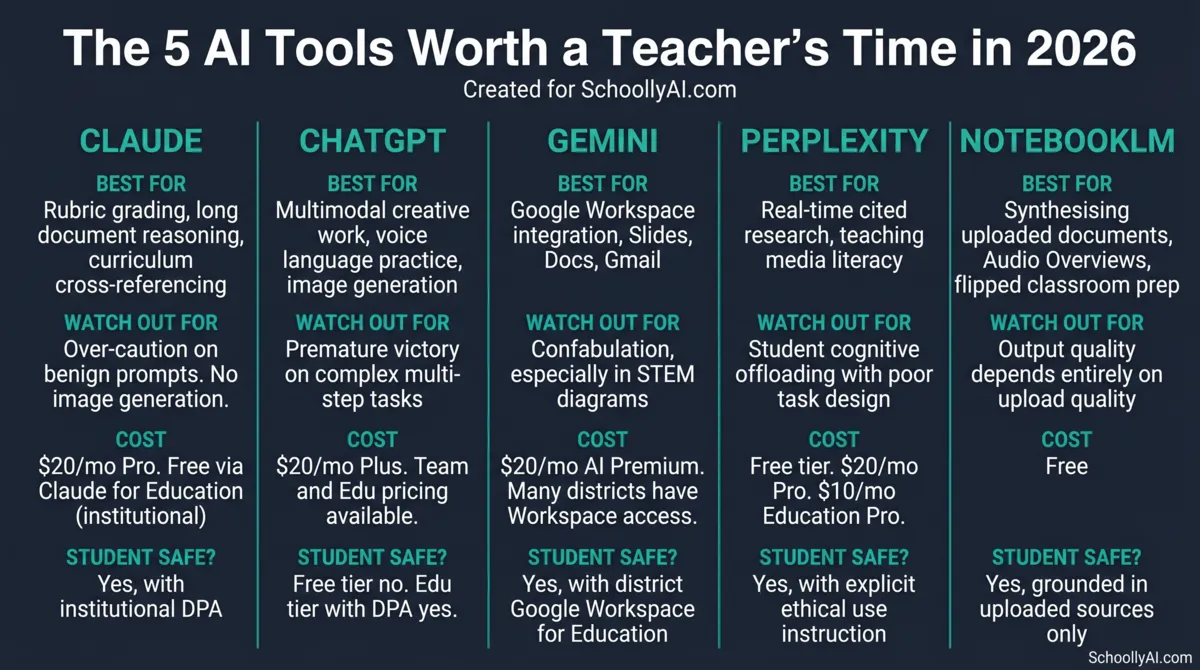
These are the tools I use. Not the fifty I tested. The five that stayed after everything else got cut. Each one does something the others do not do well. The comparison table below is the starting point; the sections that follow go deeper on each one.
1. Claude: The Methodical Analyst
Claude is my first choice for anything that requires sustained reasoning over a large volume of text. Rubric grading. Curriculum cross-referencing. Differentiating complex source material for students at multiple reading levels. These are the tasks where other tools drift, hallucinate, or lose track of the original constraints midway through. Claude does not.
The defining characteristic is context continuity. Claude maintains focus throughout long document analyses without losing track of earlier parameters. For a teacher evaluating student essays against a multi-tiered AP or IB rubric, that matters enormously. The model checks the essay against the rubric criteria rather than substituting its own judgment for what a good essay should look like.
Claude's Learning Mode, available through institutional deployments, is the most useful student-facing feature of any tool on this list. It uses Socratic questioning rather than direct answers, asking the student what evidence supports their conclusion rather than supplying the conclusion for them. This is the correct pedagogical design. It is rare.
What it does not do well: Claude's safety protocols occasionally produce false positives on perfectly benign classroom prompts. A creative writing scenario involving historical conflict, or a biology prompt about dissection, can get flagged. It is primarily text-based. If you need image generation, you are going elsewhere.
Cost: $20 per month for Pro. Anthropic introduced Claude for Education in late 2024, offering enterprise-grade privacy controls and campus-wide partnerships. Anthropic, 2024 If your institution has not looked into this, it is worth asking your IT department.
Three classroom uses I actually run:
Rubric grading: I upload a student essay alongside the marking rubric into a Claude Project. Claude evaluates the essay against specific rubric criteria and returns targeted feedback without substituting its own interpretation of what deserves full marks.
Text differentiation: I upload a university-level journal article and ask Claude to rewrite it at three distinct reading levels while preserving the core scientific vocabulary. I use this constantly for EAL learners.
Curriculum cross-referencing: I paste a lesson plan and ask Claude to identify which provincial curriculum expectations it addresses and which it misses. The model does this accurately without inventing expectations that do not exist.
2. ChatGPT: The Multimodal Generalist
ChatGPT's strength is flexibility. Text, voice, images, data interpretation: all within a single interface. For tasks that require creative output or multimodal interaction, it is the most capable tool on this list. For tasks that require precision and consistency over many steps, it is not.
The Voice Mode is genuinely useful for language education. A Spanish teacher can set ChatGPT to adopt the persona of a shopkeeper in Madrid and have students conduct full conversations in spoken Spanish. The model adapts to their proficiency level in real time. No app switching, no separate platform: it runs in the existing ChatGPT interface on a phone.
Image generation through DALL-E integration works without leaving the chat environment. A mathematics teacher explaining geometric volume can prompt for a word problem and a visual representation of the concept simultaneously. For teachers who need visuals and do not have design skills, this saves real time.
What it does not do well: ChatGPT 5.1 suffers from what practitioners call premature victory on complex multi-step tasks. When sequencing a semester-long curriculum with specific date constraints and skill progressions, the model may skip steps, miss constraints, or declare the task complete when it is not. Anything requiring sustained precision over many dependencies needs verification. r/ClaudeAI, 2026
Cost: $20 per month for Plus. OpenAI offers Team and Edu pricing with data privacy agreements that prevent student data from being used to train future models. The free tier does not carry these protections. Do not use it with student data.
Three classroom uses worth knowing:
World language practice: Voice Mode running a realistic conversation scenario in the target language, adapting to the student's level in real time.
IEP goal drafting: Custom Instructions loaded with legally compliant phrasing templates. No PII ever entered. Used purely for overcoming writer's block on measurable, standards-aligned transition goals.
Visual concept anchoring: Generating a word problem and an accompanying image simultaneously for students who need a concrete visual to engage with abstract mathematical operations.
3. Gemini: The Google Workspace Tool
If your school runs on Google Workspace, Gemini is not optional. It is the obvious first tool. The friction that every other AI tool creates, copying text from Docs, pasting into a browser, copying the output back, pasting into Docs, does not exist with Gemini. It operates directly inside Google Docs, Slides, Gmail, and Drive. For teachers already working in that environment, this is the most immediate time saving of any tool on this list.
The practical use case that gets used most: converting a dense syllabus document into a slide deck without leaving Google Slides. The Gemini side panel takes the Drive document and generates a presentation directly inside the application. No exporting, no formatting, no copying. The workflow that used to take an hour takes fifteen minutes.
Gemini 3 Pro's context window is large enough to process several hundred thousand tokens simultaneously. For administrators dealing with lengthy policy documents or teachers cross-referencing large curriculum frameworks, this matters.
What it does not do well: Gemini confabulates, producing hallucinations delivered with unearned confidence, and this is a particular problem in STEM subjects. Ask it to generate a diagram of cellular respiration and the result may look polished and professional while containing entirely fabricated or mislabelled scientific pathways. Do not use Gemini-generated scientific diagrams without verifying them against a reliable source. This is a known and documented failure mode. Digital Disruption, 2026
Cost: $20 per month for Google One AI Premium. Most K-12 districts with Google Workspace for Education already have access to enterprise Gemini with FERPA and COPPA compliance built in. Check with your IT department before paying personally.
Three classroom uses worth knowing:
Slide deck generation from existing Drive documents: Direct integration means the whole workflow happens inside Google Slides.
Laboratory safety protocol drafting: Working inside Google Docs, Gemini can identify safety hazards from a listed chemical inventory and format the output into a printable student sign-off checklist.
Administrative email drafting with calendar integration: Pulling scheduling data from Calendar and drafting translated parent communications without leaving Gmail.
4. Perplexity: The Transparent Researcher
Perplexity does something none of the other four tools do: it shows its work. Every claim it generates is accompanied by a numbered footnote linked to the original source. This is not a minor feature. It is the entire pedagogical value of the tool for classroom use.
Teaching students to verify AI output is one of the most pressing media literacy challenges of 2026. Perplexity makes that lesson concrete. A student can follow the footnote from the AI's synthesis directly to the original source, evaluate whether the source is reliable, and decide whether the AI's interpretation of that source is accurate. That is genuine critical thinking practice embedded in an assignment structure.
The Education Pro plan is $10 per month for verified students and faculty, half the price of every other premium tool on this list. It includes unlimited file uploads, higher citation density, and a Learn Mode for interactive flashcard generation. Perplexity Education Pro
In 2026 Perplexity removed advertising from its platform entirely, removing the commercial influence concern that affects other AI search tools. ALM Corp, 2026
What it does not do well: Poorly designed assignments let students use Perplexity to completely bypass reading. If the task is to summarise a text, the AI does that instantly and the student never reads the text. Assignment design matters more with Perplexity than with any other tool on this list. Grade students on what they do with the citations, not on what the AI produced.
Three classroom uses worth knowing:
Research literacy: Students use Perplexity to research a topic, then follow the footnote citations to the primary sources and write a critical analysis of the AI's synthesis. The AI output is the starting point, not the submission.
Real-time fact checking: During in-class debates, a designated student uses Perplexity to instantly verify statistical claims made by debating teams. Cited sources appear in real time.
Vocabulary sourcing from current science: For chemistry and biology units, Perplexity finds recent real-world industrial examples of the concepts being taught, pulling from current news rather than textbook examples from five years ago.
5. NotebookLM: The Grounded Synthesiser
NotebookLM is different from every other tool on this list in one critical way: it only knows what you give it. Upload five documents and it synthesises from those five documents. It does not reach out to the broader internet. It does not pull from its training data to fill gaps. If the information is not in your upload, NotebookLM says so.
For teachers who need AI output grounded in specific, verified source material, this architectural constraint is the feature. You control the inputs, so you control what the model can and cannot claim.
The Audio Overview feature is the most discussed capability in educator communities in 2026. Upload your course materials and NotebookLM generates a podcast-style conversation between two AI hosts who discuss, debate, and summarise the content. Students listen before class and arrive primed with the core arguments, leaving class time for actual discussion rather than transmission of information. By 2026, students can interrupt the AI hosts mid-conversation to ask clarifying questions, a genuinely useful interactive mode for auditory learners. Google Blog, 2026
It is completely free. For any school running tight technology budgets, this is the first tool to deploy.
What it does not do well: Garbage in, garbage out. If a student uploads incomplete or biased source material, NotebookLM synthesises from that material without flagging the gaps. The quality of the output depends entirely on the quality of what was uploaded. Students who upload an entire reading assignment and ask for a summary have bypassed the reading. Task design matters.
Three classroom uses worth knowing:
Flipped classroom Audio Overview: Upload the week's reading and generate a podcast. Students listen on their commute. Class time is reserved for Socratic discussion rather than lecture.
Differentiated study aids: Students upload their own lecture notes and generate structured flashcards, mind maps, and practice quizzes grounded in what was actually taught, not generic internet knowledge.
Policy compliance reference: Upload the full district policy manual and student code of conduct. Query specific disciplinary or legal compliance situations and get cited clause references instantly rather than searching manually through a 300-page document.
NotebookLM walkthrough: from document upload to Audio Overview and interactive study guides. Source: Google NotebookLM, 2026.
Student Privacy: The One Rule That Cannot Be Broken
Every conversation about AI tools in education eventually reaches this point, and it needs to be stated plainly rather than buried in terms and conditions.
Never input student personally identifiable information into a consumer-grade AI tool. Names, grades, IEP details, behavioural records, letters of recommendation containing identifying details: all of it is off limits. This is not a technicality. It is a legal requirement under FERPA and COPPA, and it is a straightforward matter of not betraying the trust of the students and families you serve.
Consumer-grade versions of tools like ChatGPT, standard Claude, and most free tiers use conversation data to train future model versions unless a Data Processing Agreement explicitly prohibits this. A 2026 analysis of nearly 1.2 million student AI interactions across 1,300 school districts found that roughly 1 in 5 interactions involved cheating, cyberbullying, or other problematic behaviour. Curriculum Associates, 2026 The data flowing through these tools is not neutral.
The practical rule for every tool on this list: check whether your institution has a signed enterprise agreement with a DPA. If yes, the institutional deployment is likely safe for student data. Verify with your IT department. If no, treat the tool as consumer-grade and keep student PII out of it entirely.
For a full breakdown of what safe and unsafe AI tool use looks like with student data, see Student-Safe AI Tools in 2026.
One Tool, One Week
The most practical framework to come out of educator AI communities in 2026 is simple: pick one tool. Use it exclusively for one week. Do not switch. Do not add a second tool until you have exhausted what the first one can do for your specific classroom context.
This constraint-based approach forces the kind of deliberate learning that makes any tool genuinely useful. The reason most teacher AI experiments fail is not that the tools are bad. It is that the teacher never got past the setup phase before something newer arrived and reset the cycle.
The interactive below suggests a starting tool based on your primary use case. It is a starting point, not a prescription.
Which Tool Should You Start With?
Select your most pressing classroom need and get a starting recommendation.
Gemini 3 architecture, multimodal reasoning, and Google Workspace integration in practice. Source: Digital Disruption, 2026.
AI tools for step-by-step mathematical reasoning: comparative context for STEM educators. Source: YouTube, 2026.
FAQ
The five tools worth a teacher's time in 2026 are Claude for rubric grading and long document reasoning, ChatGPT for multimodal creative work and voice practice, Gemini for Google Workspace integration, Perplexity for source-cited research and media literacy, and NotebookLM for grounded synthesis and Audio Overviews. Pick two to start. Master them before adding anything else.
The daily context tax is the time teachers spend re-explaining who they are to an AI tool at the start of every session because the tool has no persistent memory. The fix is using Claude Projects or ChatGPT Custom Instructions to build a persistent teacher profile that loads automatically in every session.
Never input student personally identifiable information into a consumer-grade AI tool. This includes names, grades, IEP details, and any other identifying data. It violates FERPA and COPPA. Institutional enterprise deployments with a signed Data Processing Agreement may be safe. Verify with your IT department first.
Build a digital twin: a single document describing your professional identity, grade level, subject, curriculum standards, and preferences. Upload it to Claude Projects or paste it into ChatGPT Custom Instructions. Both platforms load this context automatically in every session. Full walkthrough at Stop AI Amnesia in Lesson Planning.
Claude is strongest for lesson planning that requires cross-referencing curriculum standards. Gemini is the better choice if your school runs on Google Workspace, since it integrates directly with Docs and Slides. NotebookLM is useful for turning existing course materials into study guides and Audio Overviews.
Perplexity. Unlike other AI tools that synthesise from opaque training data, Perplexity runs real-time web searches and cites every claim with a numbered footnote linked to the original source. This makes it the best tool for teaching students how to verify information.
NotebookLM is best used for synthesising teacher-provided source materials without hallucinating outside information. Its most useful classroom feature is Audio Overview, which converts uploaded documents into a podcast-style discussion. Teachers use it for flipped classroom prep. Students use it to review dense reading before class. It is completely free.
Sources
- Jobs for the Future. AI in Education: Learner Perspectives 2026. 2026. jff.org
- RAND Corporation. More Students Use AI for Homework, and More Believe It Harms Critical Thinking. March 2026. rand.org
- Anthropic. Introducing Claude for Education. 2024. anthropic.com
- Stanford University. AI Feedback Tool Improves Teaching Practices. May 2023. stanford.edu
- Google Blog. 6 NotebookLM Features to Help Students Learn. 2026. blog.google
- Perplexity. What is Education Pro? 2026. perplexity.ai
- ALM Corp. Perplexity AI Abandons Advertising: Inside the Decision. 2026. almcorp.com
- Curriculum Associates. AI and Student Data Privacy: Building Trust through Responsible Design. 2026. curriculumassociates.com
- Government of Canada. Leaders, Creators and Innovators at Canada's First National Summit on AI and Culture. March 2026. canada.ca
- U15 Canada. Navigating AI in Teaching and Learning: Values, Principles and Leading Practices. 2026. u15.ca
- Chalkbeat. AI Tools Used by Teachers Can Put Student Privacy and Data at Risk. December 2024. chalkbeat.org
Want the foundation first?
Before picking a tool, it helps to understand what these things actually are. The AI Literacy mini-course covers how LLMs work, what AI can and cannot do reliably, and how to evaluate AI output critically. Three free sections. No email required.
Start the AI Literacy Course →