How to Use AI to Study for Exams
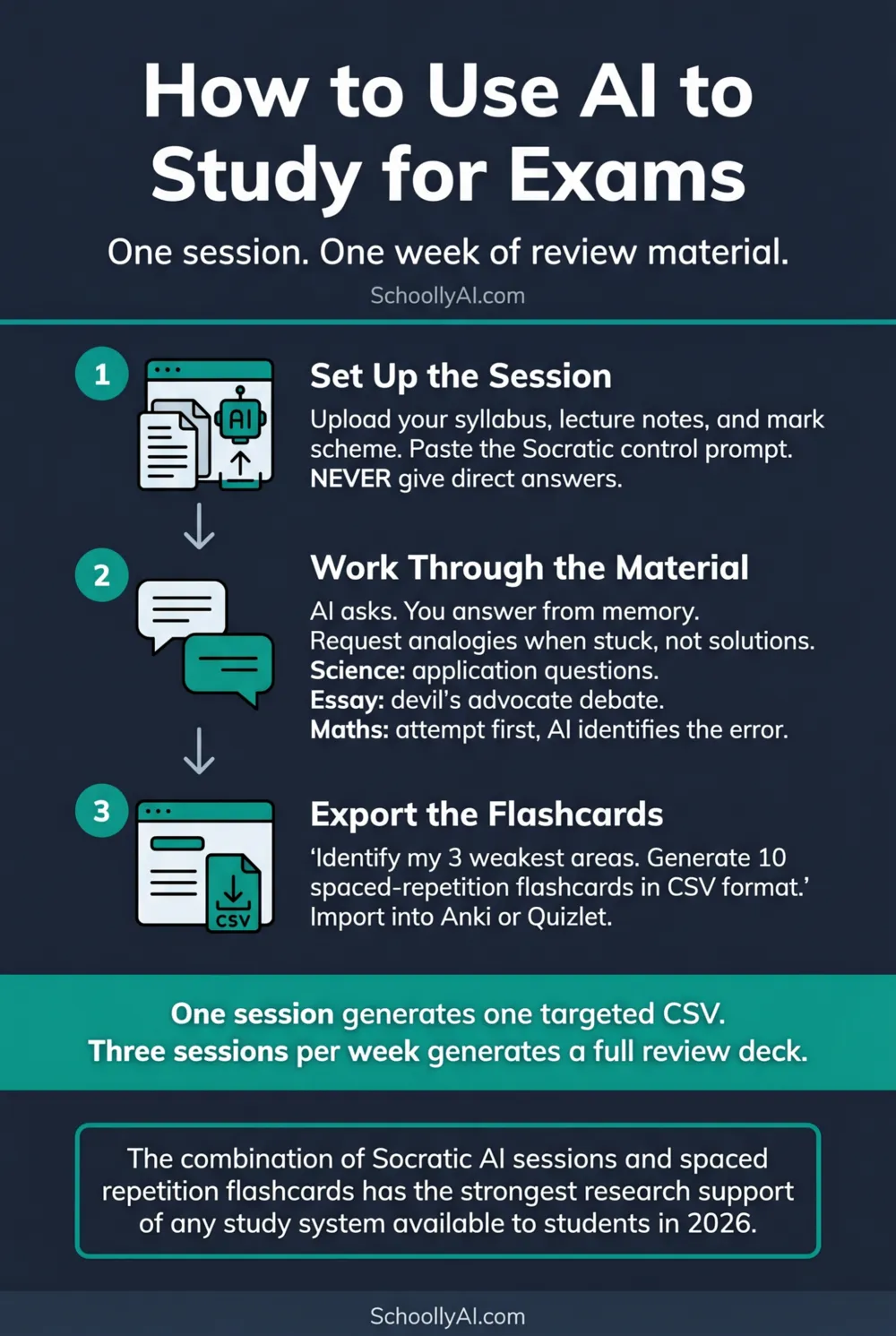
The most effective AI exam preparation is not reading AI explanations. It is using AI to generate the questions, resist answering them for you, and then export targeted flashcards from the gaps it identified. Here is the workflow from session start to spaced repetition.
- Upload your actual course materials before starting. Generic AI knowledge of your subject is less reliable than your specific syllabus and notes.
- Run the session in Slow AI mode: the AI asks questions, you answer. Not the other way around.
- End every session with a flashcard export targeting your specific weaknesses from that session. One session generates a week of review material.
- Import the CSV into Anki or Quizlet. The spaced repetition algorithm does the rest.
Before the Session
The single most common mistake in AI exam preparation is starting with no uploaded materials and asking the AI to explain the subject from scratch. What comes back is a generic overview based on the model's training data. That overview may differ from your specific curriculum, use terminology your textbook does not use, or emphasise topics your exam will not test.
Before opening the session, gather three things: the relevant section of your course syllabus, your own lecture notes from the past two weeks, and the grading rubric or mark scheme if you have one. Upload all three. Then send this instruction:
"I have uploaded my lecture notes, syllabus, and mark scheme for [specific topic/exam]. Review these documents silently. Do not summarise them. Confirm when you have processed them, then wait for my next instruction."
Once the model confirms, paste your Socratic control prompt. The full prompt and a customisable generator are in the main guide at How to Set Up a Personal AI Tutor in 20 Minutes. A minimal version that works for any subject:
"Act as a rigorous tutor for [subject]. NEVER give me direct answers. Ask me questions based on the uploaded materials that force me to retrieve information from memory. One question at a time. Keep responses under 80 words. Begin by asking which concept I find hardest to explain in my own words."
Subject-by-Subject Approaches
The same Socratic structure works across subjects, but what you ask the AI to do with your materials varies by exam type.
Science exams (biology, chemistry, physics)
After uploading your notes, ask the AI to generate five exam-style application questions at the difficulty level of your actual assessment. Work through each question independently before showing the AI your answer. Ask it to identify any errors in your reasoning without telling you the correct answer directly. Then ask it to generate the next question.
For calculations, the AI should ask you to identify the relevant formula and your reasoning before attempting the arithmetic. Only after you have attempted the calculation should it confirm whether your method is correct.
Essay-based exams (history, English, philosophy)
After uploading your notes, ask the AI to act as a "devil's advocate" examiner. Give it a potential essay thesis and ask it to challenge your argument with the three strongest counterarguments it can construct from your uploaded materials. You respond to each one. Then swap roles: you generate the counterarguments, the AI tells you which of yours are the strongest and which have gaps.
This forces you to build and defend arguments rather than passively reading essay plans. The difference in retention is significant.
Mathematics and coding exams
After uploading your problem sets and worked examples, ask the AI to generate three problems similar to your weakest topic but with different numbers or variable names. Work through each problem showing your steps. The AI should only tell you where your logic breaks down and ask you a question that points you toward the error. It should not show the corrected calculation.
For coding, describe in plain language what you want your code to do. Write the code yourself. Paste it and ask the AI to ask you questions that help you find any bugs rather than correcting them directly.
Language exams
Use ChatGPT's Voice Mode. Set the AI to conduct a spoken conversation in the target language at a level slightly above your current comfort zone. Ask it to correct your grammar errors with a question ("Can you think of another form of that verb?") rather than a correction ("The correct form is..."). Run thirty-minute spoken sessions three days before the exam.
The Flashcard Export
The most underused feature of AI exam preparation is the ability to convert your specific session weaknesses into ready-to-import flashcard sets. After the session, paste this instruction:
"Based on our session today, identify the three concepts I struggled with most. Then generate 10 spaced-repetition flashcards in CSV format. Each row should have the question on the left and the answer on the right, separated by a comma. Keep each answer under 30 words. Do not include a header row. Output only the CSV, nothing else."
The model will output a clean CSV block. Copy it, open a plain text editor, paste it, and save the file as `study-session-[date].csv`. Then import it into Anki (File, Import, select your file) or upload it to Quizlet. The flashcards load directly into your deck targeting the specific gaps from that session.
This is the most important step most students skip. Reading a good explanation in an AI session and moving on is Fast AI. Extracting the gaps from the session and converting them into spaced repetition material is Slow AI that compounds over time.
Spaced Repetition Integration
One AI study session produces one flashcard CSV. Three sessions per week for two weeks before an exam produces six CSV files. Each one targets the specific gaps from that specific session. Imported into Anki, the spaced repetition algorithm schedules each card at the interval most likely to reinforce it just before you would naturally forget it.
The combination of Socratic AI sessions for active recall and spaced repetition flashcard review for retention is the study system with the strongest research support available to a student in 2026. The Harvard physics trial, the Brookings meta-analysis, and decades of memory research on spaced retrieval all point toward the same structure: active generation of answers from memory, followed by scheduled retrieval at increasing intervals. Kestin et al., Science, 2025
The AI handles the tutoring end. Anki handles the scheduling end. The student does the actual work of retrieval. That combination is what makes the system work.
For the full five-step session setup from the beginning, including how to write the context upload instruction and which tool to choose for which subject, see How to Set Up a Personal AI Tutor in 20 Minutes. For the prompt architecture that keeps the session in Slow AI mode, see The Socratic AI Tutor Prompt: How to Build One That Works.
FAQ
Upload your course materials, paste a Socratic control prompt that prohibits direct answers, and work through the material via question-and-answer dialogue. At the end, ask the AI to identify your three weakest areas and generate ten spaced-repetition flashcards in CSV format targeting those gaps. Import the CSV into Anki or Quizlet for daily review.
Yes. Ask the AI to generate practice questions at the difficulty level of your specific exam based on your uploaded course materials. Work through each question without AI assistance first, then use the AI to check your reasoning and identify errors. Do not ask it to show the correct answer before you have attempted the question.
At the end of a study session, ask: "Generate 10 spaced-repetition flashcards in CSV format targeting the concepts I struggled with most today, question on the left, answer on the right, no header row, output only the CSV." Copy the output, save as a .csv file, then import into Anki via File, Import. The flashcards load directly into your deck.
It depends on the subject. Gemini for large volumes of course notes and textbook chapters. Claude for mathematics, formal logic, and coding, where Socratic constraints need to hold under pressure. ChatGPT's Voice Mode for subjects where verbal explanation and practice help. All three are free or very low cost.
Sources
- Kestin, G. et al. AI Tutoring Outperforms Active Learning. Science, 2025. science.org
- Brookings Institution. AI Tutors: Reviewing the Evidence. 2026. brookings.edu
- r/studytips. How to Use AI to Study in 2026. 2026. reddit.com
- Data Studios. How to Use ChatGPT's Study Mode. 2026. datastudios.ai